
 frontend
Summarize this article with AI
How to Become a Frontend Developer in 2026: A Complete Beginner’s Guide
Have you ever visited a website and wondered how its buttons work, how its layout adapts to your phone, or how it displays information without reloading the page? The technology behind these experiences is frontend development.
Frontend development is one of the most exciting paths into the software industry. You can start learning with a computer, an internet connection, and consistent practice. You do not need to master everything at once. By learning the right technologies in the right order, you can gradually build the skills needed to create modern websites and web applications.
In this guide, you will learn what frontend development is, which skills you need, what to learn first, how to build projects, and how to prepare for your first frontend developer job.
1. What Is Frontend Development?
Frontend development is the process of building the part of a website or web application that users see and interact with.
For example, when you open an e-commerce website, the product cards, navigation bar, search box, shopping cart, buttons, and checkout forms are all parts of the frontend.
Frontend developers use programming languages and tools to turn designs into functional, responsive, and interactive user interfaces.
The three fundamental technologies are:
- HTML: Defines the structure and content of a webpage.
- CSS: Controls the appearance, layout, colors, and responsiveness.
- JavaScript: Adds functionality and interactivity to the webpage.
Think of a website as a house. HTML provides the structure, CSS handles the interior design, and JavaScript makes the interactive features work.
2. Learn HTML First
HTML stands for HyperText Markup Language. It is the foundation of every standard webpage.
HTML defines elements such as headings, paragraphs, images, links, forms, buttons, and sections.
For example:
<!DOCTYPE html>
<html lang="en">
  <head>
    <title>My First Website</title>
  </head>
  <body>
    <h1>Welcome to My Website</h1>
    <p>I am learning frontend development.</p>
    <button>Click Me</button>
  </body>
</html>
This simple example creates a webpage with a heading, a paragraph, and a button.
What should you learn in HTML?
- HTML document structure
- Headings, paragraphs, links, and images
- Lists and tables
- Forms and input elements
- Semantic HTML elements
- Accessibility fundamentals
- Basic SEO-friendly markup
Do not just memorize HTML tags. Practice creating real page structures, such as a personal portfolio, a blog page, and a contact form.
3. Master CSS and Responsive Design
CSS stands for Cascading Style Sheets. It allows you to control how HTML elements look and how they are arranged on the screen.
Without CSS, most websites would look like plain documents. With CSS, you can create attractive layouts, animations, responsive navigation bars, and professional user interfaces.
Start by learning:
- Selectors and specificity
- Colors, typography, borders, and backgrounds
- The box model
- Margin and padding
- Flexbox
- CSS Grid
- Positioning
- Responsive design and media queries
- Transitions and animations
For example:
.card {
  max-width: 320px;
  padding: 24px;
  border-radius: 12px;
  background-color: #ffffff;
  box-shadow: 0 4px 16px rgb(0 0 0 / 10%);
}

.card button {
  padding: 10px 16px;
  border: none;
  border-radius: 8px;
  background-color: #2563eb;
  color: white;
  cursor: pointer;
}
This CSS creates a simple card with spacing, rounded corners, a shadow, and a styled button.
Why is responsive design important?
People use websites on mobile phones, tablets, laptops, and large desktop monitors. A good frontend developer makes sure a website works across these screen sizes.
Learn how to use flexible layouts, relative units, media queries, and responsive images. Practice converting a desktop design into a mobile-friendly interface.
4. Learn JavaScript Properly
JavaScript is one of the most important skills for frontend developers. It allows websites to respond to user actions, update content dynamically, validate forms, and communicate with servers.
Many beginners rush into React without understanding JavaScript. This often makes React concepts unnecessarily difficult.
Before learning a frontend framework, understand the following JavaScript topics:
- Variables:
let,const, and basic data types - Operators and conditional statements
- Loops
- Functions and arrow functions
- Arrays and objects
- Array methods such as
map(),filter(), andfind() - Destructuring and spread syntax
- Scope and closures
- DOM manipulation and event handling
- Promises and
async/await - Fetch API and HTTP requests
- ES modules
- Error handling
For example, imagine displaying a list of products on a webpage:
const products = [
  { id: 1, name: "Laptop", price: 800 },
  { id: 2, name: "Keyboard", price: 50 },
  { id: 3, name: "Mouse", price: 25 },
];

const affordableProducts = products.filter(
  (product) => product.price < 100
);

console.log(affordableProducts);
This code filters the products and returns those priced below 100.
JavaScript skills like these become essential when working with APIs, managing application state, and rendering lists in React.
Practice tip: Build small projects using plain JavaScript before moving to a framework. A calculator, to-do list, weather application, and form validator are excellent starting points.
5. Learn Git and GitHub
Frontend development is not just about writing code. Developers also need to manage their work, collaborate with teammates, and track changes.
Git is a version control system that records changes in your code. GitHub is a platform where you can host repositories and collaborate with other developers.
Learn these essential commands:
git init
git add .
git commit -m "Add homepage"
git branch
git switch -c feature/navbar
git push
git pull
You should understand how to create repositories, write meaningful commit messages, use branches, resolve basic merge conflicts, and work with pull requests.
GitHub can also serve as your public coding portfolio, helping employers review your projects and development practices.
6. Learn React
Once you understand HTML, CSS, and JavaScript, start learning React.
React is a JavaScript library for building user interfaces from reusable components. It is widely used to develop interactive websites, dashboards, e-commerce platforms, and SaaS applications.
For example, instead of writing the same product card markup repeatedly, you can create a reusable React component and pass different product data to it.
function ProductCard({ name, price }) {
  return (
    <article className="product-card">
      <h2>{name}</h2>
      <p>${price}</p>
      <button>Add to Cart</button>
    </article>
  );
}

export default ProductCard;
You can reuse this component for different products.
Important React concepts to learn
- Components and JSX
- Props and component composition
- State with
useState - Side effects with
useEffect - Event handling
- Conditional rendering
- Rendering lists and using keys
- Forms and controlled inputs
- Lifting state up
- Context API
- Custom hooks
- Component lifecycle concepts
- Performance optimization fundamentals
After learning the basics, explore React Router or a similar routing solution, API integration, and state management.
Do not learn every library immediately. Understand React's fundamentals first, then introduce additional tools when your projects need them.
7. Learn TypeScript
TypeScript extends JavaScript by adding static types. It helps developers catch many mistakes during development and makes large codebases easier to maintain.
For example, consider a function that accepts a user's name:
function greetUser(name: string): string {
  return `Hello, ${name}!`;
}

greetUser("Unish");
The type annotation indicates that name must be a string and the function returns a string.
Important TypeScript concepts include:
- Primitive types
- Arrays and objects
- Type aliases and interfaces
- Union types
- Optional properties
- Function types
- Generics
- Type narrowing
- Typing React props and state
- Typing API responses
TypeScript is particularly useful when building production applications with React, because it helps keep components, data models, and API contracts consistent.
8. Learn Modern Frontend Tools
After learning the fundamentals, gradually become comfortable with the tools used in modern frontend projects.
CSS frameworks and component libraries: Tailwind CSS helps you style interfaces using utility classes. Component libraries such as shadcn/ui can speed up the development of accessible, reusable interface components.
Routing: React Router or TanStack Router helps you build applications with multiple pages and navigation.
Data fetching: Learn how to request data from APIs, handle loading and error states, and manage server data. TanStack Query is one option for managing server-state workflows.
Forms and validation: React Hook Form and Zod are useful for building forms and validating user input.
Build tools: Learn the basics of npm or pnpm, package management, Vite, environment variables, and production builds.
Testing: Start with unit and component testing using tools such as Vitest and React Testing Library. Learn browser-based end-to-end testing with Playwright as you advance.
Remember that tools are replaceable. Your understanding of JavaScript, browser behavior, accessibility, and UI architecture is more important than memorizing a particular library.
9. Build Real Projects
Watching tutorials can help you understand concepts, but building projects teaches you how to apply them.
Start with simple projects and gradually increase their complexity.
Beginner projects
- Personal portfolio website
- Responsive landing page
- Calculator
- To-do list
- Digital clock
Intermediate projects
- Weather application using an API
- Movie search application
- Expense tracker
- Blog with search and filtering
- E-commerce product listing page
Advanced projects
- Admin dashboard with charts and filters
- Project management application
- Real-time chat application
- E-commerce application with a shopping cart
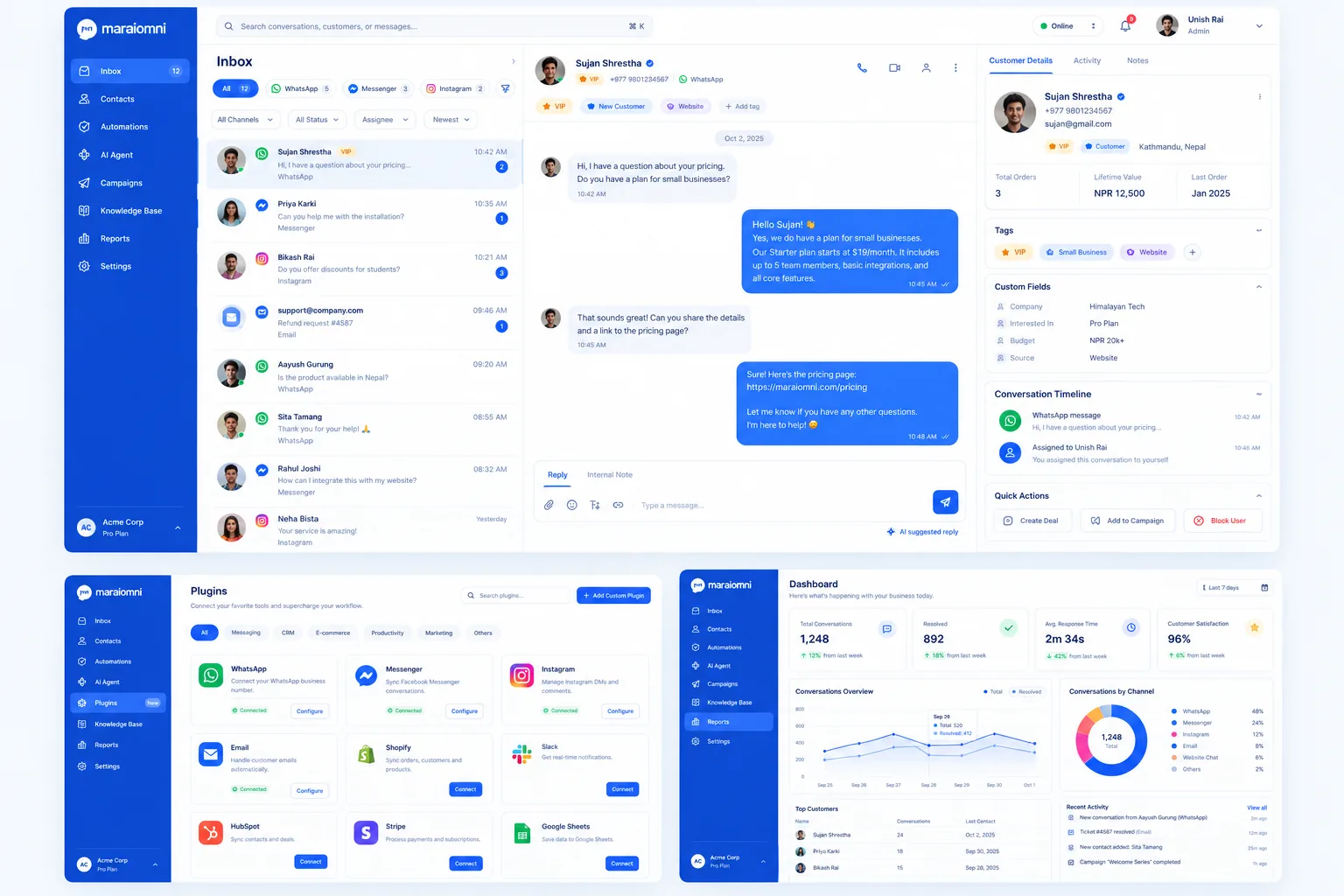
- Customer support inbox with conversations and team assignments
For every project, focus on more than the visual appearance. Add loading states, error handling, responsive layouts, input validation, accessibility, and a clear user experience.
When possible, deploy your projects using platforms such as Vercel or Netlify so people can try them online.
10. Build a Strong Portfolio
Your portfolio is an opportunity to demonstrate your skills beyond a resume.
A good portfolio should include:
- A short introduction about you
- Your technical skills
- Two to four well-developed projects
- Live project links
- GitHub repository links
- A brief explanation of each project's purpose
- The challenges you faced and how you solved them
- Your contact information
Avoid building many nearly identical tutorial projects. A few polished projects that solve real problems can demonstrate more value than a large collection of unfinished applications.
For each project, explain what you built, why you made certain technical decisions, and what you learned.
11. Understand APIs and How the Web Works
Frontend developers frequently work with backend services. You do not need to become a backend expert immediately, but you should understand how a browser communicates with a server.
Learn about:
- HTTP and HTTPS
- Request methods such as GET, POST, PATCH, and DELETE
- HTTP status codes
- JSON
- REST APIs
- Authentication and authorization basics
- Cookies and browser storage
- CORS
- Loading, empty, and error states
- Basic web security
For example, a frontend application might request a list of products from a backend API, display a loading indicator, and then render the returned products.
Understanding these interactions will help you build applications that behave correctly under real-world conditions rather than only displaying static designs.
12. Learn to Work Like a Professional Developer
Technical knowledge alone does not guarantee success in a development role. Professional frontend developers must also understand how to write maintainable code and collaborate with others.
Develop these habits:
- Write readable, reusable components.
- Use meaningful variable and function names.
- Keep components focused on clear responsibilities.
- Avoid unnecessary duplication.
- Follow accessibility best practices.
- Check responsive layouts and browser compatibility.
- Test important user interactions.
- Review code before opening a pull request.
- Communicate blockers and progress clearly.
- Learn to debug errors instead of relying entirely on copy-pasted solutions.
Also, learn to read existing codebases. In a real job, you will often work on an application built by other developers rather than starting from scratch.
AI coding assistants can help explain errors, generate examples, and suggest improvements. However, make sure you understand the code you accept and can explain why it works.
13. Prepare for Your First Frontend Developer Job
When you have a solid foundation and several projects, start preparing for internships and junior frontend positions.
Review the following areas:
HTML and CSS interviews
- Semantic HTML
- Accessibility
- Box model
- Flexbox and Grid
- Responsive design
- CSS specificity
JavaScript interviews
- Scope and closures
- Hoisting
- Promises and
async/await - Event loop
- Array and object manipulation
thisand prototypes- Common coding problems
React interviews
- Props and state
- Hooks and effect dependencies
- Rendering behavior
- Controlled forms
- Component composition
- State management
- API integration
- Performance fundamentals
Practical preparation
- Build a UI from a Figma design.
- Fetch and display API data.
- Implement search, filtering, and pagination.
- Debug an existing application.
- Explain your project architecture.
- Use Git branches and pull requests.
Apply when you meet the core requirements rather than waiting until you know every technology. Continue learning while applying and use interview feedback to identify areas for improvement.
14. A Practical Six-Month Learning Roadmap
Here is an example roadmap for someone starting from zero. You can adjust the timeline depending on your available hours and progress.
Month | Focus | Expected outcome |
|---|---|---|
1 | HTML and CSS | Build responsive webpages |
2 | JavaScript fundamentals | Build interactive projects |
3 | Advanced JavaScript and Git | Work with APIs and version control |
4 | React fundamentals | Build component-based applications |
5 | TypeScript and modern tools | Develop more structured applications |
6 | Portfolio, testing, and interviews | Prepare projects and apply for roles |
A realistic daily routine could include 30 minutes reviewing concepts, 60 minutes coding, and 30 minutes improving a project or solving problems.
Consistency matters more than trying to study for many hours one day and then stopping for a week. If you have more time, use it to build projects and deepen your understanding rather than rushing through additional frameworks.
Six months is a planning target, not a guarantee of job readiness. Your progress will depend on your starting level, practice quality, and the expectations of the roles you pursue.
15. Common Mistakes Beginners Should Avoid
1. Learning too many frameworks at once. Master the fundamentals before jumping between React, Vue, Angular, and other tools.
2. Watching tutorials without building anything. Pause tutorials, reproduce the concepts independently, and create your own variations.
3. Copying code without understanding it. Try to explain each important function and component in your own words.
4. Ignoring responsive design and accessibility. A beautiful desktop-only page is not a complete user interface.
5. Skipping JavaScript fundamentals. Framework knowledge cannot replace a strong understanding of the language.
6. Waiting too long to apply for jobs. Once you can build and explain complete projects, start applying while continuing to improve.
7. Giving up when code breaks. Debugging is a normal part of development. Learn to read error messages, inspect browser developer tools, and isolate problems systematically.
Conclusion
Becoming a frontend developer is a journey of continuous learning and practical experience. Start with HTML and CSS, build a strong foundation in JavaScript, learn Git, move to React and TypeScript, and use your knowledge to create real projects.
You do not need to know every technology to begin. You need a clear learning path, consistent practice, and the willingness to solve problems when things do not work as expected.
Start with one small webpage today. Improve it tomorrow. Build a complete project next month. Over time, those small steps can develop into the skills and confidence needed for a professional frontend development career.
The best way to become a frontend developer is not simply to study more. It is to learn, build, debug, and repeat.